Vectra: A Retro Display Font for Modern Web Design
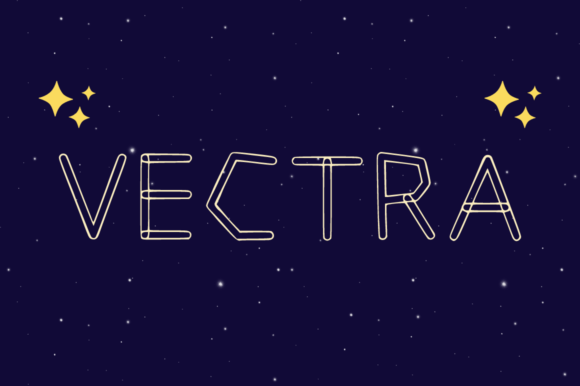
Vectra transforms standard web typography into a nostalgic visual experience that immediately captures user attention. As a display typeface designed with a distinct retro twist, this font brings a playful energy to digital interfaces without sacrificing professional polish. When you are building landing pages or online stores, the right fonts can dictate the rhythm of your layout and influence how users scan content. Vectra offers both outline and filled styles, giving designers the flexibility to adapt their brand voice from bold headlines to subtle decorative accents.
How Vectra Enhances Visual Hierarchy in Hero Sections
The first thing visitors notice on any website is the hero section, and Vectra excels at commanding space with its unique character. In a sea of generic sans-serif headers, using this display font creates an immediate focal point that guides the eye toward your primary value proposition. The filled style works exceptionally well for large-scale text overlays on high-resolution images, ensuring that your message remains legible even against busy backgrounds. For digital product creators, establishing this strong visual hierarchy early increases the likelihood of converting a casual browser into an engaged lead. By leveraging the playful personality of Vectra, you can soften the corporate tone often found in tech startups while maintaining a sense of modern authority.
Vectra for Boutique Online Store Banners and Product Headers
When designing an e-commerce interface, Vectra adds a layer of charm that makes products feel curated rather than mass-produced. Imagine using the outline version of this display font for sale banners or seasonal promotions; the negative space within the letters allows background patterns or product photography to peek through, creating depth. This technique is particularly effective for boutique brands that want to evoke a vintage aesthetic while selling modern goods. The versatility of these fonts means you can switch between styles to differentiate between new arrivals and clearance items, helping shoppers quickly parse information. A consistent use of this typographic voice across your shop reinforces brand identity and builds trust with returning customers.
Why Vectra Works for Call-to-Action Buttons and Micro-Interactions
Conversion-focused layouts rely heavily on clear calls to action, and Vectra provides a distinctive look that stands out from standard UI elements. While body copy should remain neutral for readability, applying the filled weight of this display font to buttons or short phrases like "Get Started" can inject excitement into the user journey. The retro twist inherent in the design draws the eye naturally, encouraging clicks without feeling aggressive. For SaaS founders and app developers, integrating these fonts into interactive states—such as hover effects where the outline fills in—adds a tactile quality to the digital experience. This attention to detail signals that your product is crafted with care, which subtly influences user perception of value.
Vectra for Creative Portfolio Site Headlines and Project Titles
Creative professionals need their websites to reflect their unique style, and Vectra serves as a perfect signature for portfolio sections. Using this display font for project titles allows designers to showcase their work without overwhelming the viewer with heavy text blocks. The playful nature of the typeface suggests creativity and innovation, making it ideal for agencies, illustrators, and graphic artists. You can pair the outlined style with minimalist white space to let the artwork breathe, while using the solid style to anchor key achievements. These fonts help establish a memorable digital presence that distinguishes your personal brand from competitors who stick to rigid, traditional typography.
Optimizing Readability and Contrast with Outline and Filled Styles
Designing for mobile screens requires careful consideration of contrast and legibility, areas where Vectra shines due to its dual-style architecture. On smaller devices, the outline variant can reduce visual clutter when placed over light backgrounds, preventing the text from feeling too heavy or dense. Conversely, the filled style ensures high visibility on dark mode interfaces or when overlaid on colorful gradients. Understanding how these fonts behave across different screen sizes is crucial for maintaining a seamless user experience. By adjusting the size and weight appropriately, you ensure that your retro aesthetic does not compromise accessibility or readability for users scanning content on the go.
Vectra for Blog Graphics, Course Pages, and Social Media Assets
Content creators often struggle to maintain consistency across various platforms, but Vectra offers a cohesive solution for blogs and educational materials. Applying this display font to blog post headers, course module titles, or social media graphics creates a unified visual language that audiences recognize instantly. The nostalgic vibe appeals to readers looking for authentic storytelling, making it a great choice for lifestyle bloggers or coaches sharing personal journeys. Since these fonts are versatile, they can be scaled down for thumbnail images or blown up for video intros without losing their character. This adaptability saves time on asset creation while ensuring your brand looks professional across every touchpoint.
Pairing Strategies for Balanced Digital Brand Identity
A successful web design relies on harmonious typography, and Vectra pairs beautifully with clean, geometric sans-serif fonts for body text. Because this display font carries so much personality, it needs a neutral companion to keep the page readable and grounded. Try combining Vectra with a simple sans-serif typeface to create a dynamic contrast that highlights headings while keeping paragraphs easy to digest. For editorial-style websites or fashion blogs, pairing with a classic serif font can elevate the overall sophistication of the layout. These strategic fonts combinations allow you to build a complex brand identity that feels both approachable and authoritative, ensuring your message resonates with the right audience.
Vectra for Logo Design and Branded Web Content
Incorporating Vectra into logo design or branded web content can give your business a timeless yet contemporary edge. The unique shapes of this display font make it suitable for custom logotypes that need to stand out in crowded marketplaces. Whether you are launching a new coffee shop, a creative studio, or a digital agency, the retro twist adds a layer of character that generic typefaces lack. When used consistently across your website, email templates, and marketing materials, these fonts reinforce brand recall and create a lasting impression. Investing in a premium font like Vectra ensures that your visual assets are high-quality and legally licensed for commercial use, protecting your brand identity in the long run.